Commands
This page explains how to use Ririko's commands and how to control them in your server. It ends with a list of every command. Each feature page has the full options of its commands.
1. Use a Command
Ririko has two kinds of commands. Both do the same thing.
- Slash commands. Type
/in the message box, pick a command, and fill in its options. - Prefix commands. Type a prefix, then the command name and its options. The default prefix is
!. For example,!balanceor!play never gonna give you up.
You can also mention the bot instead of using a prefix, for example @Ririko help.
Some commands have short names called aliases. !bal works like !balance. The tables in section 7 show the aliases.
A few commands are context menus. You right-click a message and choose Apps. See section 6.
1.1. Get Help
Run /help (or !help) to open the Help Center.
- Run
/help. - Pick a category in the menu.
- Read the commands in that category.
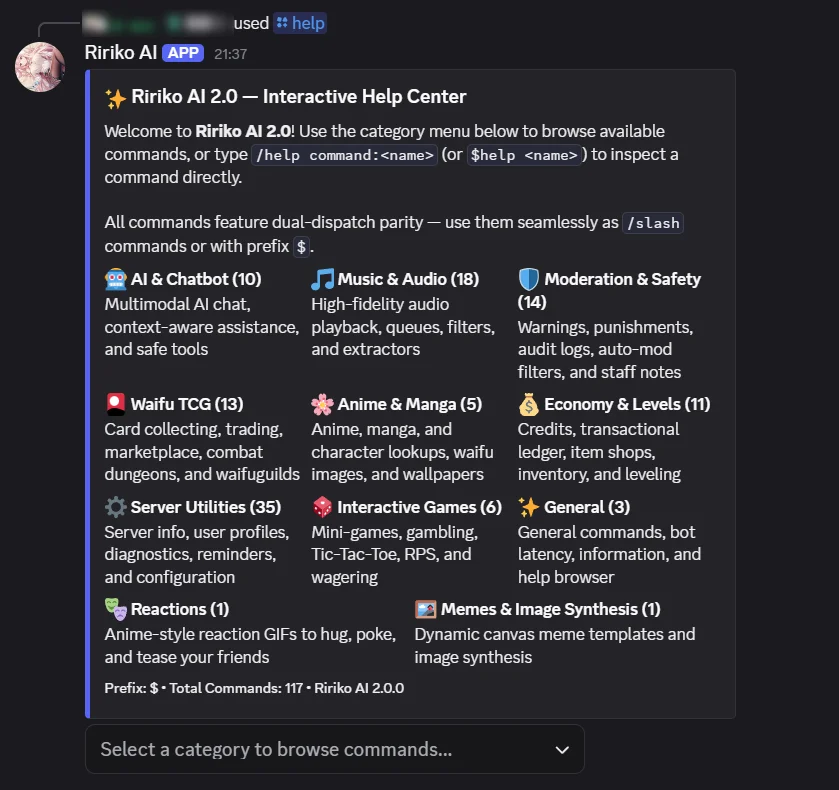
To see one command, run /help command:<name>. Ririko shows its description, usage, aliases, permissions and cooldown.
1.2. Change the Prefix
Only members with the Manage Server permission can change the prefix. A prefix has 1 to 5 characters and no spaces.
- Run
/prefix. Ririko shows the current prefix. - Run
/prefix set:?to set the prefix to?.
You can also change the prefix on the dashboard General page. Slash commands do not use the prefix.
2. Who Can Use a Command
Most commands are open to everyone. Some commands need a Discord permission. The tables in section 7 list them.
- The command checks the permission of the person who runs it.
- Ririko also needs the matching permission. If it lacks one, it tells you which.
- Moderation commands also check the role order. You cannot act on a member whose highest role is equal to or above yours.
- The server owner passes every permission check.
- Commands marked "server only" do not work in direct messages.
- Bot owners are the people listed in
BOT_OWNER_ID. They can use owner-only actions, such as the global rules in/tcg-admin.
3. Cooldowns and Limits
Each command has a cooldown. After you use a command, you must wait before you use it again. The cooldown counts per member. The /help command shows the cooldown of a command.
Ririko also limits how fast you can send commands. The default is 10 commands in 10 seconds. Server owners and members with the Administrator permission pass this limit.
A server admin can change the cooldown of a command. See section 4.
4. Control Commands in Your Server
You need the Manage Server permission.
- Open the dashboard and pick your server. See dashboard.md.
- Open the Commands page.
- Find the command. Use the search box.
- Change the rule. You can:
- turn the command off,
- allow only some roles,
- block some roles,
- set a different cooldown.
- Add a channel rule if the command should behave differently in one channel.
- Save.
Rules apply to slash and prefix commands.
- A channel rule wins over the server rule.
- Threads follow the rules of their channel.
- Members with Manage Server ignore on/off and role rules, so they cannot lock themselves out. Cooldowns still apply to them.
/help,/pingand/prefixare always available.
The Games page sets the same kind of rule for the mini-games. See modules.md.
4.1. Maintenance Mode
An operator can put the bot in maintenance mode with ririko bot:maintenance. While it is on, only bot owners can run commands. Everyone else gets a message with the reason. See development.md.
5. Register Slash Commands
Discord allows 100 slash commands in each scope. Ririko uses two scopes.
- Global. Member commands. They show in every server. They also include the context menu.
- Per server. Admin and setup commands. Ririko registers them in each server it joins. The next list shows which commands they are.
Per-server commands:
- Moderation:
automod,ban,unban,softban,kick,timeout,untimeout,warn,history,note,nick,purge,lock,unlock. - Server setup:
prefix,welcomer,farewell,autorole,temprole,create-reaction-role,reaction-roles,autovoice,setup-music. - AI and images:
aichannel,aipersona,setup-stablediffusion-api,stablediffusion-model. - Streams, events and cards:
stream,setup-stream-notification,giveaway,tcg-admin.
The old short names are prefix-only. They do not use slash slots. Their slash form is the main command.
| Prefix-only name | Slash form |
|---|---|
!gcreate, !gend, !greroll, !gdelete, !gedit, !glist | /giveaway action:<...> |
!avc | /autovoice |
!vname, !vlimit, !vlock, !vunlock, !vpermit, !vkick, !vclaim, !vtransfer | /voice action:<...> |
!subscribe, !unsubscribe | /stream action:<...> |
If you host Ririko yourself, register the slash commands once:
-
Run the bot with
SYNC_COMMANDS=trueonce, or run this command:ririko commands:sync --global --all-guilds -
Wait. Discord can take a while to show global commands. Press
Ctrl+Rin Discord to refresh.
To see how many slots are free, run ririko commands:sync with no options. The full steps for Docker are in deployment.md. The command-line tool is in development.md.
6. Message Context Menu: Translate to English
You can translate a message into English.
- Right-click the message. On a phone, open the message menu.
- Choose Apps, then Translate to English.
Only you see the result. It uses the AI provider of the server. See ai.md.
- It translates the text of the message and the readable text of its embeds.
- It does not read attachments or linked pages.
- Input is limited to 12,000 characters.
- A result longer than 2,000 characters comes as the file
translation-en.txt. - The cooldown is 10 seconds.
- This is a context menu only. There is no
/translatecommand. - Translation sends the text to an AI provider, so you must have pressed I agree on the AI question first. Until then you see the question in place of the translation (ai.md section 2.1).
7. All Commands
This list shows every command. "Everyone" means no permission is needed. An alias works with a prefix, such as !bal.
7.1. General
| Command | Aliases | What it does | Who can use it |
|---|---|---|---|
/ping | latency | Shows the bot's latency. | Everyone |
/help | commands, h | Opens the Help Center. | Everyone |
/freegames | free-games, freegame | Shows free games. See modules.md. | Everyone to show. Manage Server to set up |
7.2. Economy
See economy.md.
| Command | Aliases | What it does | Who can use it |
|---|---|---|---|
/balance | bal, money | Shows a wallet and bank. | Everyone |
/daily | d | Claims the daily reward. | Everyone |
/deposit | dep | Moves credits into the bank. | Everyone |
/withdraw | with | Moves credits out of the bank. | Everyone |
/pay | give, transfer | Sends credits to a member. | Everyone |
/leaderboard | lb, top | Shows the XP ranking. | Everyone |
/profile | rank | Shows a profile card or sets its background. | Everyone |
/shop | store | Lists the shop or buys an item. | Everyone |
/inventory | inv, bag | Lists your items. | Everyone |
/use | consume | Uses an item. | Everyone |
/karma | k | Shows karma or gives 1 karma. | Everyone (server only to give) |
7.3. Music
See music.md. All music commands work in a server only.
| Command | Aliases | What it does | Who can use it |
|---|---|---|---|
/play | p | Plays or queues a song. | Everyone |
/pause | Pauses. | Everyone, or the DJ role | |
/resume | Resumes. | Everyone, or the DJ role | |
/skip | s, next | Skips the song. | Everyone, or the DJ role |
/back | prev, previous | Plays the previous song. | Everyone, or the DJ role |
/stop | Stops and clears the queue. | Everyone, or the DJ role | |
/queue | q, list | Shows the queue. | Everyone |
/nowplaying | np | Shows the current song. | Everyone |
/volume | vol, v | Shows or sets the volume. | Everyone, or the DJ role to set |
/loop | repeat, l | Sets the loop mode. | Everyone, or the DJ role |
/shuffle | sh | Shuffles the queue. | Everyone, or the DJ role |
/seek | Jumps to a time. | Everyone, or the DJ role | |
/filter | f, effects | Turns an audio filter on or off. | Everyone, or the DJ role |
/lyrics | ly | Shows lyrics. | Everyone |
/join | connect, j | Joins your voice channel. | Everyone |
/leave | dc, disconnect | Leaves the voice channel. | Everyone, or the DJ role |
/playlist | pl | Manages your playlists. | Everyone |
/setup-music | Creates the music channel. | Manage Server |
"Or the DJ role" means: when the server sets a DJ role, only that role and members with Manage Server can use the command.
7.4. AI and Images
See ai.md.
| Command | Aliases | What it does | Who can use it |
|---|---|---|---|
/ai | ask | Chats, or changes the AI settings. With action:clear, scope:here clears your memory in this channel and scope:all (!ai clear all) deletes your AI conversations in every server and channel. Messages already sent to an AI provider cannot be recalled. With action:consent, consent:status shows whether and when you agreed to AI features, and consent:withdraw (!ai consent withdraw) takes your consent back and deletes your AI conversations and AI preferences. Chat, translation and images work only after you press I agree on the question Ririko shows you (ai.md section 2.1). | Everyone. Manage Server for the settings |
/chat | c | Chats with Ririko. | Everyone |
/aiclear | clearchat, reset-ai | Clears your chat memory. | Everyone |
/aichannel | setaichannel | Sets the AI channel. | Manage Server or Manage Channels |
/aipersona | aistyle | Sets the AI personality. | Manage Server |
/aimodel | setmodel | Shows or sets the AI model. | Everyone to show. Manage Server to set |
/imagine | img, ai-image, generate-image | Makes an image. You must have pressed I agree on the AI question first. | Everyone |
/stablediffusion-model | sdmodel, sd-model, imagemodel, image-model | Sets the image defaults. | Manage Server |
/setup-stablediffusion-api | setup-sd-api | Explains where image keys go. | Manage Server |
| Translate to English | Context menu. | Everyone |
7.5. Moderation
See moderation.md. All moderation commands work in a server only.
| Command | Aliases | What it does | Permission |
|---|---|---|---|
/warn | w | Warns a member. | Timeout Members |
/timeout | mute, to | Times a member out. | Timeout Members |
/untimeout | unmute | Ends a timeout. | Timeout Members |
/kick | boot | Kicks a member. | Kick Members |
/softban | sb | Bans and unbans, to delete messages. | Ban Members |
/ban | b | Bans a member. | Ban Members |
/unban | Ends a ban. | Ban Members | |
/purge | clear, clean | Deletes messages. | Manage Messages |
/lock | Locks a channel. | Manage Channels | |
/unlock | Unlocks a channel. | Manage Channels | |
/nick | nickname | Changes or resets a nickname. | Manage Nicknames |
/history | modlogs, cases | Shows a member's moderation history. | Timeout Members |
/note | Adds or shows staff notes. | Timeout Members | |
/automod | Shows or changes AutoMod rules. | Manage Server |
7.6. Server Tools
See modules.md.
| Command | Aliases | What it does | Who can use it |
|---|---|---|---|
/stream | Manages stream alerts. | Everyone to list. Manage Server for the rest | |
/subscribe | sub, stream-sub, streamsub | Follows a streamer (prefix only). | Manage Server |
/unsubscribe | unsub, stream-unsub, streamunsub | Unfollows a streamer (prefix only). | Manage Server |
/setup-stream-notification | setup-twitch, setup-stream, setup-streams, setup-stream-channel, setstreamchannel, stream-channel | Sets the alert channel. | Manage Server |
/stream-status | twitch-status, streamstatus, streams, streamers | Lists followed streamers. | Everyone |
/giveaway | Manages giveaways. | Everyone to list. Manage Messages or Manage Server for the rest | |
/gcreate, /gend, /greroll, /gdelete, /gedit, /glist | Old giveaway names (prefix only). | Same as /giveaway | |
/autovoice | Sets up "Join to Create" channels. | Manage Channels or Manage Server | |
/voice | Manages your temporary voice channel. | The channel owner | |
/avc, /vname, /vlimit, /vlock, /vunlock, /vpermit, /vkick, /vclaim, /vtransfer | Old voice names (prefix only). | Same as /autovoice and /voice | |
/create-reaction-role | createreactionrole, crr | Adds a reaction role. | Manage Roles or Manage Server |
/reaction-roles | reactionroles, rr | Lists or removes reaction roles. | Manage Roles or Manage Server |
/autorole | auto-role, joinrole | Sets join and verification roles. | Manage Roles or Manage Server |
/temprole | temporaryrole, trole | Gives roles that expire. | Manage Roles or Manage Server |
/reminder | remindme, reminders | Sets reminders. | Everyone |
/prefix | setprefix | Shows or sets the prefix. | Everyone to show. Manage Server to set |
/timezone | tz, settimezone, set-timezone | Shows or sets a time zone. | Everyone for yourself. Manage Server for the server |
/get-avatar | avatar, pfp | Shows an avatar. | Everyone |
/guild-info | guildinfo, server-info, serverinfo, info | Shows server information. | Everyone (server only) |
/member-info | memberinfo, user-info, userinfo, whois | Shows member information. | Everyone (server only) |
/welcomer | welcome | Sets the welcome card. | Manage Server |
/farewell | goodbye | Sets the farewell card. | Manage Server |
7.7. Games
See modules.md and adventure-game.md.
| Command | Aliases | What it does | Who can use it |
|---|---|---|---|
/tictactoe | ttt, tic-tac-toe | Plays Tic-Tac-Toe. | Everyone |
/rps | rock-paper-scissors | Plays Rock-Paper-Scissors. | Everyone |
/highlow | high-low, hl | Plays High or Low. | Everyone |
/coinflip | coin-flip, cf | Flips a coin. | Everyone |
/dice | roll | Rolls dice. | Everyone |
/adventure | adv, journey, quest-adventure | Plays a story adventure. | Everyone (server only). Manage Server for the settings |
7.8. Waifu TCG
See waifu-tcg.md for admins and tcg-player-guide.md for players.
| Command | Aliases | What it does | Who can use it |
|---|---|---|---|
/card | tcg | Manages your cards and gear. | Everyone |
/cards | album, mycards | Opens your card album. | Everyone |
/game | battle, duel, tcggame | Duels, expeditions, raids, quests and the town shop. | Everyone |
/item | tcgitem, items | Items, enhancing and crafting. | Everyone |
/craft | forge | Crafts gear and potions. | Everyone |
/loadout | gear, equipment | Opens the gear menu of a card. | Everyone |
/dungeon | tower, climb, spire | Climbs the dungeon tower. | Everyone |
/trade | cardtrade, tcgtrade | Trades cards and credits. | Everyone |
/market | marketplace, tcgmarket | Buys and sells cards. | Everyone |
/waifuguild | wguild, guild | Manages WaifuGuilds. | Everyone |
/achievement | ach, achievements | Lists and claims achievements. | Everyone |
/tcg-admin | tcgadmin, tcgconfig | Sets card drops and the TCG rules. | Manage Server, or the TCG Manager Role. Bot owners for global rules |
/tcg-info | tcginfo, tcgguide, tcg-guide, card-guide, waifu-guide | Opens the TCG guide. | Everyone |
7.9. Anime, Reactions and Memes
See modules.md.
| Command | Aliases | What it does | Who can use it |
|---|---|---|---|
/anime | Searches anime. | Everyone | |
/manga | Searches manga. | Everyone | |
/anime-character | character | Searches characters. | Everyone |
/waifu | Sends a random waifu image. | Everyone | |
/wallpaper | wallpapers | Finds anime wallpapers. | Everyone |
/react | Each reaction name, such as hug | Sends a reaction GIF. | Everyone |
/meme | Each template name, such as chad | Makes a meme. | Everyone |