Economy and Levels
Ririko has credits (money) and XP (experience). Members earn both by chatting, by being in voice channels, by claiming a daily reward and by playing games. They spend credits in the shop, in mini-games and in the card game.
1. How It Works
- Credits are the money of Ririko. Your credits are the same in every server. Each member has a wallet and a bank.
- XP is kept for each server. XP gives you a level in that server.
- Karma is a small score that members give each other in a server.
- A profile card is a picture that shows your level, rank and credits.
Server admins cannot set the number of credits that members earn. This stops one server from creating credits for everyone. Bot owners set the global values (see section 8).
Turn it on. The economy is always on. Admins can change how XP works in their server on the dashboard XP & Ranking page (see section 7).
2. Commands
All economy commands are open to everyone.
2.1. Credits and Bank
| Command | Aliases | Options | What it does |
|---|---|---|---|
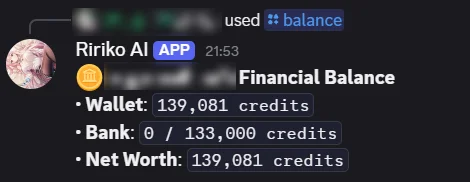
/balance | bal, money | target (member) | Shows the wallet, bank and net worth. |
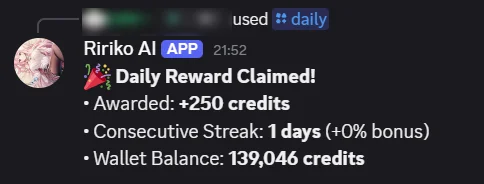
/daily | d | None | Claims the daily reward. |
/deposit | dep | amount (required) | Moves credits from the wallet to the bank. Type a number or all. |
/withdraw | with | amount (required) | Moves credits from the bank to the wallet. Type a number or all. |
/pay | give, transfer | target (required), amount (required, at least 1) | Sends credits from your wallet to a member. You cannot pay yourself. |
The reply to /balance shows the wallet, the bank and the net worth:
2.2. Ranking and Profile
| Command | Aliases | Options | What it does |
|---|---|---|---|
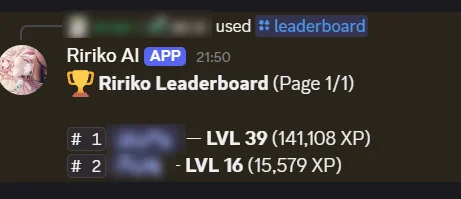
/leaderboard | lb, top | scope (server or global), page | Shows the XP ranking. |
/profile | rank | target (member), background (link) | Shows a profile card. With a link or an attached image, it sets your own background. |
/karma | k | action (view or give), target (member) | Shows karma. With give, you give 1 karma to another member. You cannot give karma to yourself. Server only. |
The reply to /leaderboard ranks members by level and XP:
Profile background rules:
- The image can be at most 1200 x 400 pixels and 5 MB.
- The link must be public. Ririko saves a copy of the image.
- You can use a link, or attach an image when you use the prefix form.
2.3. Shop and Items
| Command | Aliases | Options | What it does |
|---|---|---|---|
/shop | store | action (list or buy), item (item code), quantity | Lists the shop. With buy, buys an item. |
/inventory | inv, bag | target (member) | Lists the items of a member. |
/use | consume | item (item code, required), quantity | Uses an item from your bag. |
Every item has a code. /shop and /inventory show it. You type the code in /shop buy and in /use.
The shop starts with these items:
| Code | Name | Price | What it does |
|---|---|---|---|
candy_minor | Minor Energy Candy | 100 | Restores 20 energy. You can buy 1 each day. |
stamina_potion | Stamina Potion | 350 | Restores 50 energy. You can use 3 each day. |
exp_potion_small | Small EXP Potion | 250 | Gives 150 XP in the server where you use it. |
profile_bg_voucher | Profile Background Voucher | 1500 | A cosmetic voucher. |
Energy is used by the card game. See tcg-player-guide.md. Bot owners can add and change items (see section 8).
3. How You Earn Credits and XP
| Activity | Credits | XP | Limit |
|---|---|---|---|
| Send a chat message | 20 | 15 to 25 | Once every 60 seconds |
| Be in a voice channel | 35 | 40 | Each minute, if an admin turned on voice rewards |
/daily | See section 4 | None | Once each reset day |
| Win a mini-game | You get your wager back, doubled | None | See modules.md |
| Card game and adventures | Listed on their pages | Listed on their pages | See waifu-tcg.md and adventure-game.md |
The XP of a chat message and of a voice minute follow the XP rate of the server.
Ririko pays nothing for spam. A message earns nothing when:
- it is shorter than 5 characters,
- it is almost the same as one of your last few messages (80% or more alike),
- it is sent at an inhuman speed. You then wait 30 minutes before you earn again.
Voice rewards need all of these:
- An admin turned on Voice rewards.
- You are with at least one other member. Two members are the least.
- You are not muted or deafened.
- You are not in the AFK channel.
- You are not in a no-XP channel and you do not have a no-XP role.
4. Daily Reward
/daily gives credits and builds a streak.
- The base reward is 250 credits.
- Each further day in a streak adds 5%. The bonus stops at +150%.
- You can claim once each reset day. A new day starts at 00:00 in GMT+8 by default.
- If you miss 1 or 2 days, you keep your streak. The missed days are skipped, not counted. A streak of 15 days with 2 missed days continues at 16.
- If you miss 3 days or more in a row, the streak starts again. That claim counts as day 1.
The host can change the reset time and the number of days you may miss. See section 9.
5. Bank
- The wallet holds credits you carry. You can lose them in games.
- The bank is safe. Games cannot take credits from it.
- Bank capacity is 10,000 credits plus 2,500 for each level. Your level here is the level of your XP added together across all servers.
- If your capacity gets lower, you keep your credits. You can withdraw them, but you cannot deposit more.
6. Levels
To go from level L to level L+1 you need 5 x L x L + 50 x L + 100 XP. Level 0 to 1 takes 100 XP. Level 1 to 2 takes 155 XP.
- When you level up, Ririko can announce it (see section 7).
- You can turn level-up messages off for yourself.
- A higher level raises your bank capacity and your card game energy.
7. Server XP Settings
You need the Manage Server permission.
- Open the dashboard and pick your server. See dashboard.md.
- Open the XP & Ranking page.
- Change the settings.
- Save.
| Setting | What it does |
|---|---|
| Announce level-ups | Turns level-up messages on or off. Members who turned them off for themselves are never announced. |
| Level-up channel | Where the messages go. Without one, Ririko posts in the channel of the level-up. Voice level-ups are announced only here. |
| XP rate (%) | 100 is normal. 200 doubles XP. 0 turns XP off. The most is 300. |
| No-XP channels | Chat and voice channels that earn no XP. Up to 50. Threads follow their channel. |
| No-XP roles | Members with these roles earn no XP. Up to 25. |
| Voice rewards | Turns on credits and XP for voice time. It is off by default. |
You can also use the command line: ririko guild:config <server> xp.<key> <value>.
8. Global Settings for Bot Owners
Credits, the daily reward, the bank and the shop are the same in every server. Bot owners (the users in BOT_OWNER_ID) change them. A passkey is required. See dashboard.md.
- Open the dashboard and go to the Owner console.
- Open Economy for the values below, or Item shop for items.
- Change the values and save.
| Setting | Default | Range |
|---|---|---|
| Daily base reward | 250 | 0 to 1,000,000 |
| Streak bonus for each further day (%) | 5 | 0 to 100 |
| Largest streak bonus (%) | 150 | 0 to 1,000 |
| Bank capacity at level 0 | 10,000 | 0 to 1,000,000,000 |
| Bank capacity for each level | 2,500 | 0 to 10,000,000 |
You can also run ririko economy:config [key] [value].
Each shop item has a code, a name, a price, a rarity, a category, an icon, a daily limit and an effect. The code has 2 to 32 lowercase letters, digits or underscores. It cannot change after you save it. An item that members hold, or an item from the starting list, can be retired but not deleted.
9. Reset Time Settings for Hosts
All daily systems use one reset time. These settings are in .env.
| Variable | Default | What it does |
|---|---|---|
RIRIKO_RESET_OFFSET_MINUTES | 480 | Minutes ahead of UTC. 480 is GMT+8. |
RIRIKO_RESET_TIME | 00:00 | The reset time of day, in that offset. |
RIRIKO_RESET_TIME_DAILY | The value above | The reset time for /daily. |
RIRIKO_RESET_TIME_ENERGY | The value above | The reset time for card game energy. |
RIRIKO_RESET_TIME_ENERGY_POTIONS | The value above | The reset time for the daily energy potion limit. |
RIRIKO_RESET_TIME_TCG_SHOP | The value above | When the card game town shop changes stock. |
RIRIKO_RESET_TIME_SHOP_PURCHASES | The value above | The reset time for the daily purchase limits of the shop. |
RIRIKO_DAILY_STREAK_FORGIVENESS | 3 | Days in a row you can miss before the streak ends. 0 turns forgiveness off. |
Restart the bot after you change them. See deployment.md.